How We Built a Condition-Based Search System for Our Mail Inbox
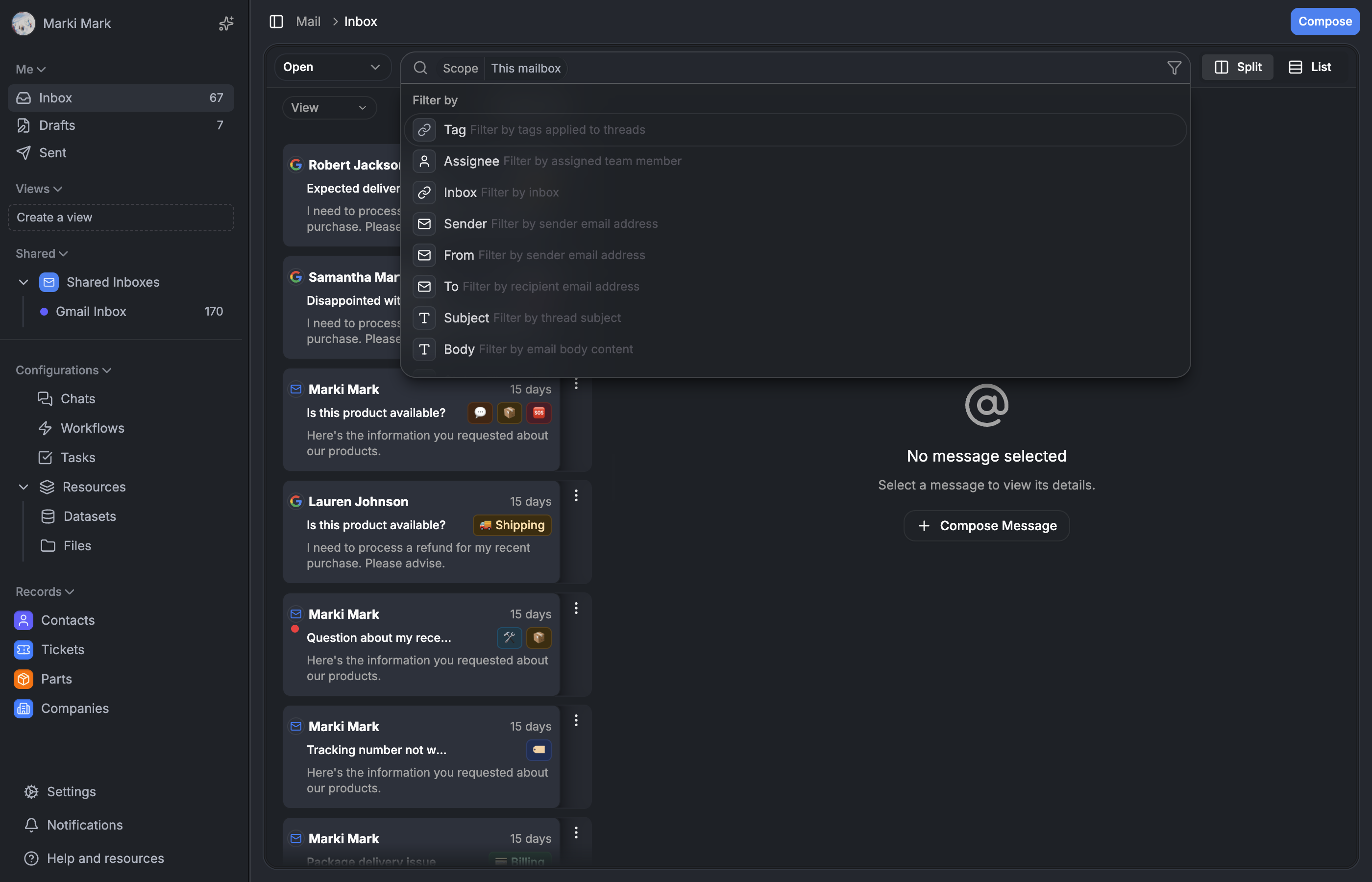

A deep dive into the condition-based search system powering Auxx.ai's mail inbox — from the generic component architecture and Zustand store to the Drizzle query builder that turns filter chips into SQL.
Why not just use a text input?
Early on, our mail search was a text input that ran a LIKE query across subjects and bodies. It worked until it didn't. Support agents needed to find "all open tickets tagged 'refund' assigned to me from the last week" — and a free-text box can't express that.
We needed structured search. Not a query language that users have to learn (nobody reads docs for a search bar), but something that feels like typing into a search box while secretly building a structured query underneath.
The result is a condition-based system: every filter is a typed SearchCondition object. The UI renders them as editable chips. The backend maps each one to a specific Drizzle query builder. No parsing, no regex, no ambiguity.
This post covers the full stack — from the component architecture and Zustand store on the frontend, through the condition model that bridges both sides, to the query builder that turns conditions into SQL.
The component architecture — three layers
We split the search system into three layers. This wasn't a premature abstraction — we knew we'd need search in the CRM, knowledge base, and other views eventually. The generic layer was worth it from day one.
Layer 1: Generic primitives live in components/searchbar/. These know nothing about mail, tickets, or any domain:
SearchBarShell— the visual shell with popover, keyboard shortcuts, and input orchestrationSearchFilterInput— horizontal scroll area containing condition badges and a text inputSearchSuggestionsList— grouped dropdown with "Recent Searches" and "Filter by" sectionscreateSearchStore— a Zustand store factory that any domain can instantiate
Layer 2: Domain wrapper lives in components/mail/searchbar/. It's thin — about 200 lines total:
// apps/web/src/components/mail/searchbar/index.tsx

export function MailSearchBar({ onSearch, className, isLoading }: MailSearchBarProps) {
  const hasActiveConditions = useSearchStore(selectHasActiveConditions)
  const displayText = useSearchStore(selectDisplayText)
  const conditions = useSearchStore((s) => s.conditions)
  const actions = useSearchActions()

  const { suggestions, isLoading: suggestionsLoading } = useSearchSuggestions({
    query: '',
    enabled: true,
  })

  return (
    <ConditionProvider
      conditions={conditions}
      config={{
        mode: 'resource',
        fields: MAIL_VIEW_FIELD_DEFINITIONS.filter((f) => f.id !== SEARCH_SCOPE_FIELD_ID),
        showGrouping: false,
        compactMode: true,
      }}
      getFieldDefinition={(fieldId) => getMailViewFieldDefinition(fieldId)}
      onConditionsChange={handleConditionsChange}>
      <SearchBarShell
        conditions={conditions}
        hiddenFieldIds={MAIL_HIDDEN_FIELD_IDS}
        actions={actions}
        suggestions={suggestions}
        onSearch={() => onSearch(displayText)}
        renderAdvancedFilter={({ conditions, onApply, onCancel }) => (
          <AdvancedFilterMode
            initialConditions={conditions}
            onApply={onApply}
            onCancel={onCancel}
          />
        )}
        pinnedFieldIds={MAIL_HIDDEN_FIELD_IDS}
        placeholder='Search (/)...'
      />
    </ConditionProvider>
  )
}
The wrapper's job: connect the generic shell to mail-specific field definitions, the mail Zustand store, and the mail suggestion hooks. That's it.
Layer 3: Integration happens in mail-box.tsx, where search conditions merge with URL routing context and flow into the thread list. More on that later.
Everything is a SearchCondition
This is the core type that drives the entire system:
// apps/web/src/components/searchbar/types.ts

interface SearchCondition {
  id: string            // UUID
  fieldId: string       // 'tag', 'assignee', 'status', 'inbox', etc.
  operator: Operator    // 'is', 'in', 'contains', 'isEmpty', etc.
  value: any            // Field-specific value
  displayLabel?: string // Human-readable label for entity references
}
Why conditions instead of query strings? A few reasons:
- Structured data travels cleanly. You can serialize conditions to JSON, store them in a database, restore them losslessly. No parsing step, no ambiguity about what "refund open" means.
- Each condition maps to one query builder. The backend doesn't parse — it switches on
fieldIdand calls the right builder function. - Conditions compose independently. You can pin one, hide another, merge a third. The store handles deduplication when you add a second tag.
A search query is just an array of these objects. Recent searches store the full array, not display text. Restoring a recent search recreates the exact filter state — entity references, operators, multi-values, everything.
The Zustand store — a factory, not a singleton
The store is created via a factory function. This lets different domains (mail, CRM, etc.) create separate store instances with different configurations:
// apps/web/src/components/searchbar/create-search-store.ts

export function createSearchStore(
  options: CreateSearchStoreOptions
): UseBoundStore<StoreApi<SearchState>> {
  const {
    name,
    getFieldLabel,
    persistRecent = false,
    pinnedConditions: pinnedTemplates = [],
    pinnedFieldIds = new Set(),
  } = options

  const initialConditions = createPinnedConditions(pinnedTemplates)

  const storeCreator = immer<SearchState>((set) => ({
    conditions: initialConditions,
    contextKey: null,
    isOpen: false,
    showAdvanced: false,
    editingConditionId: null,
    highlightedIndex: null,
    recentSearches: [],

    addCondition: (fieldId, operator, value, displayLabel) =>
      set((state) => {
        const existingIndex = state.conditions.findIndex((c) => c.fieldId === fieldId)
        if (existingIndex !== -1) {
          // Merge with existing condition
          const existing = state.conditions[existingIndex]
          if (Array.isArray(existing.value) && !Array.isArray(value)) {
            if (!existing.value.includes(value)) {
              existing.value.push(value)
            }
          } else {
            existing.value = value
          }
        } else {
          state.conditions.push({ id: generateId(), fieldId, operator, value, displayLabel })
        }
      }),

    clearConditions: () =>
      set((state) => {
        state.conditions = createPinnedConditions(pinnedTemplates)
      }),

    // ... remaining actions
  }))
}
The interesting bit is addCondition. When you add a condition for a field that already exists (e.g., adding a second tag), it merges the values instead of creating a duplicate. Array values get deduped. Scalar values get replaced. This means the UI never shows conflicting conditions for the same field.
Pinned conditions
Mail search always has a "scope" condition — "this mailbox" or "everywhere." It's implemented as a regular condition that's pinned:
// Mail store creates with a pinned scope condition
const store = createSearchStore({
  name: 'mail-search-store-v2',
  persistRecent: true,
  pinnedConditions: [{
    id: 'scope',
    fieldId: SEARCH_SCOPE_FIELD_ID,
    operator: 'this_mailbox',
    value: null,
  }],
  pinnedFieldIds: new Set([SEARCH_SCOPE_FIELD_ID]),
})
Pinned conditions can't be removed by the user, are hidden from badge display via hiddenFieldIds, and are excluded from the condition count and recent search persistence. The backend doesn't need special scope handling — it's just another condition in the array.
Selectors avoid re-renders
We use selector functions scoped to the pinned field IDs:
// apps/web/src/components/searchbar/create-search-store.ts

export function createSearchSelectors(
  pinnedFieldIds: Set<string>,
  getFieldLabel?: (fieldId: string) => string | undefined
) {
  const selectHasActiveConditions = (state: SearchState): boolean => {
    return state.conditions.some((c) => !pinnedFieldIds.has(c.fieldId))
  }

  const selectConditionCount = (state: SearchState): number => {
    return state.conditions.filter((c) => !pinnedFieldIds.has(c.fieldId)).length
  }

  const selectDisplayText = (state: SearchState): string => {
    return state.conditions
      .filter((c) => !pinnedFieldIds.has(c.fieldId))
      .map((c) => {
        const label = getFieldLabel?.(c.fieldId)?.toLowerCase() || c.fieldId
        const displayValue = c.displayLabel || c.value
        return `${label}:${displayValue}`
      })
      .join(' ')
  }

  return { selectHasActiveConditions, selectConditionCount, selectDisplayText }
}
Components subscribe to individual selectors, not the whole store. selectConditionCount only triggers re-renders when the count changes, not when a condition's value is edited.
Field definitions drive everything
One array defines every filterable field in the mail inbox:
// packages/lib/src/mail-views/mail-view-field-definitions.ts

export const MAIL_VIEW_FIELD_DEFINITIONS: MailViewFieldDefinition[] = [
  {
    id: 'tag',
    label: 'Tag',
    type: BaseType.RELATION,
    fieldType: FieldType.RELATIONSHIP,
    options: {
      relationship: {
        inverseResourceFieldId: 'tag:threads',
        relationshipType: 'has_many',
        isInverse: false,
      },
    },
    description: 'Filter by tags applied to threads',
  },
  {
    id: 'assignee',
    label: 'Assignee',
    type: BaseType.ACTOR,
    fieldType: FieldType.ACTOR,
    options: { actor: { target: 'user', multiple: false } },
    description: 'Filter by assigned team member',
  },
  {
    id: 'status',
    label: 'Status',
    type: BaseType.ENUM,
    fieldType: FieldType.SINGLE_SELECT,
    options: {
      options: [
        { value: 'unassigned', label: 'Unassigned' },
        { value: 'assigned', label: 'Assigned' },
        { value: 'done', label: 'Done' },
        { value: 'trash', label: 'Trash' },
        { value: 'spam', label: 'Spam' },
      ],
    },
    description: 'Filter by thread status',
  },
  // ... inbox, sender, from, to, subject, body, date, hasAttachments, freeText
]
Each field has a fieldType that determines:
- Which operators are available (derived automatically via
getOperatorsForFieldType()) - What input component renders in the condition badge (entity picker, enum select, date picker, text)
- What icon appears in the suggestion dropdown
Add a field here, and it flows through the entire stack — suggestions, condition badges, operator picker, and the backend query builder all pick it up.
Keyboard-first design
Support agents process high volume. Mouse-only search is a bottleneck. The searchbar is built keyboard-first:
Global shortcut: / opens the search popover from anywhere in the mail view. We check that no input is focused first:
// apps/web/src/components/searchbar/searchbar-shell.tsx

useEffect(() => {
  const handleKeyDown = (e: KeyboardEvent) => {
    if (e.key === '/' && !isOpen && !isInputFocused()) {
      e.preventDefault()
      setIsOpen(true)
      setTimeout(() => inputRef.current?.focus(), 50)
    }
  }
  window.addEventListener('keydown', handleKeyDown)
  return () => window.removeEventListener('keydown', handleKeyDown)
}, [isOpen])
Within the searchbar: ArrowDown/Up navigates suggestions. Enter selects the highlighted suggestion, adds a free-text condition, or executes the search. Escape clears input first, then closes the popover on second press.
Backspace-to-delete: When the input is empty and you press Backspace, it highlights the last visible condition badge. Press Backspace again to delete it. This matches how users expect tag/chip inputs to work:
// apps/web/src/components/searchbar/search-filter-input.tsx

if (e.key === 'Backspace' && inputValue === '' && conditions.length > 0) {
  const lastVisibleIndex = conditions.findLastIndex((c) => !hiddenFieldIds?.has(c.fieldId))
  if (lastVisibleIndex === -1) return

  e.preventDefault()
  if (highlightedIndex === lastVisibleIndex) {
    // Second backspace: delete highlighted condition
    onRemoveCondition(conditions[highlightedIndex].id)
    onHighlightChange(null)
  } else {
    // First backspace: highlight last visible condition
    onHighlightChange(lastVisibleIndex)
  }
  return
}
The / → type → Enter flow lets power users search without touching the mouse.
Suggestions — two sources, one dropdown
The suggestion dropdown combines two data sources:
Field definitions (client-side): Filtered instantly from MAIL_VIEW_FIELD_DEFINITIONS. No network request. Shows field label + description + type icon. Users see available filters as they type.
Recent searches (server-side): Fetched via the recentSearches tRPC endpoint. These store the full SearchCondition[] as JSON, so restoring a search is lossless — not a text approximation.
// apps/web/src/components/searchbar/search-suggestions-list.tsx

const GROUP_LABELS: Record<SearchSuggestionType, string> = {
  recent: 'Recent Searches',
  field: 'Filter by',
}

// Order: recent first, then fields
const typeOrder: SearchSuggestionType[] = ['recent', 'field']
The dropdown groups suggestions by type — "Recent Searches" always appears first. Each recent item has a delete button on hover. Each field item shows an icon mapped from its BaseType.
Recent search persistence
When a search executes, conditions are saved both client-side (localStorage via Zustand persist middleware) and server-side:
// apps/web/src/server/api/routers/search.ts

saveSearch: protectedProcedure
  .input(z.object({
    conditions: z.array(searchConditionSchema),
    displayText: z.string(),
  }))
  .mutation(async ({ input, ctx }) => {
    // Clean up old entries if at limit (20 per user)
    // ...

    const searchData = JSON.stringify({
      displayText: input.displayText,
      conditions: input.conditions,
    })
    await ctx.db.insert(schema.SearchHistory).values({
      userId: ctx.session.userId,
      organizationId: ctx.session.organizationId,
      query: `__CONDITIONS__${searchData}`,
    })
  }),
The __CONDITIONS__ prefix distinguishes structured searches from legacy text searches. When loading recent searches, the router parses the JSON, deduplicates by display text, and returns up to 5 unique entries with their full condition arrays.
The bridge — context meets search
This is where the frontend hands off to the backend. The mail inbox has two sources of filtering:
- URL routing context — which inbox you're viewing, which tag folder, which status filter
- User search conditions — what the user typed/selected in the searchbar
Both need to become SQL. The buildConditionGroups function merges them:
// packages/lib/src/mail-query/context-to-conditions.ts

export function buildConditionGroups(
  contextParams: ContextConditionParams,
  searchConditions?: { id: string; fieldId: string; operator: string; value: any }[]
): ConditionGroup[] {
  const groups: ConditionGroup[] = []

  // Check if user selected "everywhere" scope
  const scopeCondition = searchConditions?.find((c) => c.fieldId === SEARCH_SCOPE_FIELD_ID)
  const searchScope = scopeCondition?.operator === 'everywhere' ? 'everywhere' : 'current'

  // Filter out the scope condition — it's not a real query condition
  const realSearchConditions = searchConditions?.filter(
    (c) => c.fieldId !== SEARCH_SCOPE_FIELD_ID
  )

  if (searchScope === 'everywhere') {
    // Only add default TRASH/SPAM exclusion
    groups.push({
      id: 'context',
      logicalOperator: 'AND',
      conditions: [{
        id: 'ctx-status-exclude',
        fieldId: 'status',
        operator: 'not in',
        value: ['TRASH', 'SPAM', 'IGNORED'],
      }],
    })
  } else {
    // Build context group, but remove conditions whose fieldId
    // is overridden by a search condition
    const contextGroup = buildContextConditions(contextParams)
    if (realSearchConditions?.length) {
      const searchFieldIds = new Set(realSearchConditions.map((c) => c.fieldId))
      contextGroup.conditions = contextGroup.conditions.filter(
        (c) => !searchFieldIds.has(c.fieldId)
      )
    }
    if (contextGroup.conditions.length > 0) {
      groups.push(contextGroup)
    }
  }

  // Add real search conditions
  if (realSearchConditions?.length) {
    groups.push({
      id: 'search',
      logicalOperator: 'AND',
      conditions: realSearchConditions.map((c) => ({
        id: c.id, fieldId: c.fieldId, operator: c.operator, value: c.value,
      })),
    })
  }

  return groups
}
The interesting design here: when a search condition uses the same fieldId as a context condition, the search condition wins. If you're viewing the "support" inbox but search for a specific inbox, the search filter replaces the context filter instead of creating a contradiction.
The query builder — conditions become SQL
buildConditionGroupsQuery is the final translation layer. It takes ConditionGroup[] and returns a Drizzle SQL<unknown> that goes into a WHERE clause.
Groups combine with AND at the top level. Within each group, conditions combine with AND or OR depending on the group's logicalOperator:
// packages/lib/src/mail-query/condition-query-builder.ts

export function buildConditionGroupsQuery(
  groups: ConditionGroup[],
  organizationId: string
): SQL<unknown> {
  if (groups.length === 0) {
    return eq(Thread.organizationId, organizationId)
  }

  const groupConditions = groups.map((group) => buildGroupQuery(group, organizationId))
  const validConditions = groupConditions.filter(Boolean) as SQL<unknown>[]

  return and(eq(Thread.organizationId, organizationId), ...validConditions)!
}
Each condition dispatches to a field-specific builder:
function buildConditionQuery(condition: Condition, organizationId: string): SQL<unknown> | null {
  const { fieldId, operator, value } = condition

  switch (fieldId) {
    case 'tag':
      return buildTagQuery(operator, value, organizationId)
    case 'assignee':
      return buildAssigneeQuery(operator, value)
    case 'inbox':
      return buildInboxQuery(operator, value)
    case 'status':
      return buildStatusQuery(operator, value)
    case 'date':
      return buildDateQuery(operator, value)
    case 'sender':
      return buildSenderQuery(operator, value)
    case 'subject':
      return buildSubjectQuery(operator, value)
    case 'body':
      return buildBodyQuery(operator, value)
    case 'freeText':
      return buildFreeTextQuery(operator, value)
    case 'hasAttachments':
      return buildHasAttachmentsQuery(operator, value)
    // ... more fields
  }
}
Simple fields — direct column matches
Some fields map directly to columns on the Thread table:
function buildInboxQuery(operator: Operator, value: any): SQL<unknown> | null {
  const raw = Array.isArray(value) ? value : [value]
  const inboxIds = raw.map((v: string) => isRecordId(v) ? getInstanceId(v as RecordId) : v)

  switch (operator) {
    case 'is':
      return inboxIds.length === 1
        ? eq(Thread.inboxId, inboxIds[0])
        : inArray(Thread.inboxId, inboxIds)
    case 'is not':
      return inboxIds.length === 1
        ? not(eq(Thread.inboxId, inboxIds[0]))
        : not(inArray(Thread.inboxId, inboxIds))
    case 'empty':
      return isNull(Thread.inboxId)
    case 'not empty':
      return isNotNull(Thread.inboxId)
    default:
      return null
  }
}
Assignee and status work similarly. Status has extra logic to map user-facing values like "unassigned" to compound conditions (isNull(assigneeId) AND status = OPEN).
Relationship fields — subqueries over JOINs
Tags are a many-to-many relationship. The naive approach would be a JOIN, but JOINs multiply rows: a thread with 3 matching tags appears 3 times in the result set. Pagination breaks.
Instead, we use EXISTS subqueries:
function buildTagQuery(operator: Operator, value: any, organizationId: string): SQL<unknown> | null {
  switch (operator) {
    case 'in':
    case 'is': {
      const tagIds = Array.isArray(value) ? value : [value]
      if (tagIds.length === 0) return null
      // EXISTS (SELECT 1 FROM field_values WHERE thread_id = thread.id AND tag_id IN (...))
      return threadHasTags(db, Thread.id, tagIds, organizationId)
    }
    case 'empty':
      return threadHasNoTags(db, Thread.id, organizationId)
    case 'not empty':
      return threadHasAnyTags(db, Thread.id, organizationId)
  }
}
The threadHasTags helper builds a correlated subquery: EXISTS (SELECT 1 FROM field_values WHERE thread_id = thread.id AND value_record_id IN (...)). Each thread still appears once in the result, regardless of how many tags match. Pagination stays correct.
Message content fields — cross-table subqueries
Sender, from/to, body, and subject queries need to reach into the Message and MessageParticipant tables. These also use EXISTS:
function buildSenderQuery(operator: Operator, value: any): SQL<unknown> | null {
  const { Message, MessageParticipant, Participant } = schema

  switch (operator) {
    case 'contains':
      return exists(
        db
          .select({ id: sql`1` })
          .from(Message)
          .innerJoin(MessageParticipant, eq(MessageParticipant.messageId, Message.id))
          .innerJoin(Participant, eq(Participant.id, MessageParticipant.participantId))
          .where(
            and(
              eq(Message.threadId, Thread.id),
              eq(MessageParticipant.role, 'FROM'),
              ilike(Participant.identifier, `%${value}%`)
            )
          )
      )
    // ...
  }
}
The from, to, cc, and bcc fields all query the same MessageParticipant table, differentiated by the role column. The query builder doesn't care which field the UI created — it just switches on fieldId and builds the right subquery.
Free text — searching everything
The free-text condition searches across subject and body in one shot:
function buildFreeTextQuery(operator: Operator, value: any): SQL<unknown> | null {
  if (!value) return null
  const searchTerm = `%${value}%`

  return or(
    ilike(Thread.subject, searchTerm),
    exists(
      db
        .select({ id: sql`1` })
        .from(schema.Message)
        .where(
          and(
            eq(schema.Message.threadId, Thread.id),
            or(
              ilike(schema.Message.textPlain, searchTerm),
              ilike(schema.Message.textHtml, searchTerm)
            )
          )
        )
    )
  )
}
This is what runs when a user just types text and hits Enter without selecting a specific field. It's intentionally broad.
Type safety across the stack
The condition fieldId string connects four systems without a shared enum:
- Field definitions (client) — determines available operators and input type
- Zustand store (client) — stores the condition with typed value
- Condition groups (shared) — transport format between client and server
- Query builder (server) — switches on
fieldIdto select the right SQL builder
There's no runtime validation at the boundary. The field definitions constrain what conditions the UI can create, and the query builder handles exactly those field IDs. If someone adds a new field to MAIL_VIEW_FIELD_DEFINITIONS, the query builder logs a warning for the unknown fieldId and skips it — no crash, just no filtering.
Key trade-offs
| Decision | Trade-off | Why we chose it |
|---|---|---|
| Conditions, not query strings | More complex store and serialization | Lossless persistence, no parsing ambiguity, composable filters |
| Generic shell + domain wrapper | Two layers to understand | Reusable across mail, CRM, KB without duplication |
| EXISTS subqueries for relationships | Potentially slower than JOINs for simple cases | Correct pagination counts, no row multiplication |
| Pinned conditions (scope) | Hidden complexity in the store | Backend treats scope as just another condition — no special handling |
| Field definitions as single source | Adding a field requires touching one file | Operators, UI, and query builder all derive from the same definition |
__CONDITIONS__ prefix for storage | Hacky string prefix in a text column | Backward compatible with legacy text searches, no migration needed |
| Client-side + server-side recent searches | Dual storage, potential drift | Instant restore from localStorage, persistent across devices from server |
What we'd do differently
The __CONDITIONS__ prefix in the SearchHistory.query column is the most obvious shortcut. A proper conditions JSONB column would be cleaner. We'll migrate when we add saved search views.
The fieldId string connecting frontend and backend without a shared type is fine at our scale (15 fields), but would benefit from a shared enum if we grow to 50+. For now, the query builder's default case logging a warning is enough safety.
We don't have full-text search yet — the freeText condition uses ILIKE, which doesn't scale. That's a future PostgreSQL tsvector or Typesense integration. The condition model won't change — just the builder for the freeText field.