Building a Multi-Provider AI System — Part 1: Provider Registry & Credential Routing
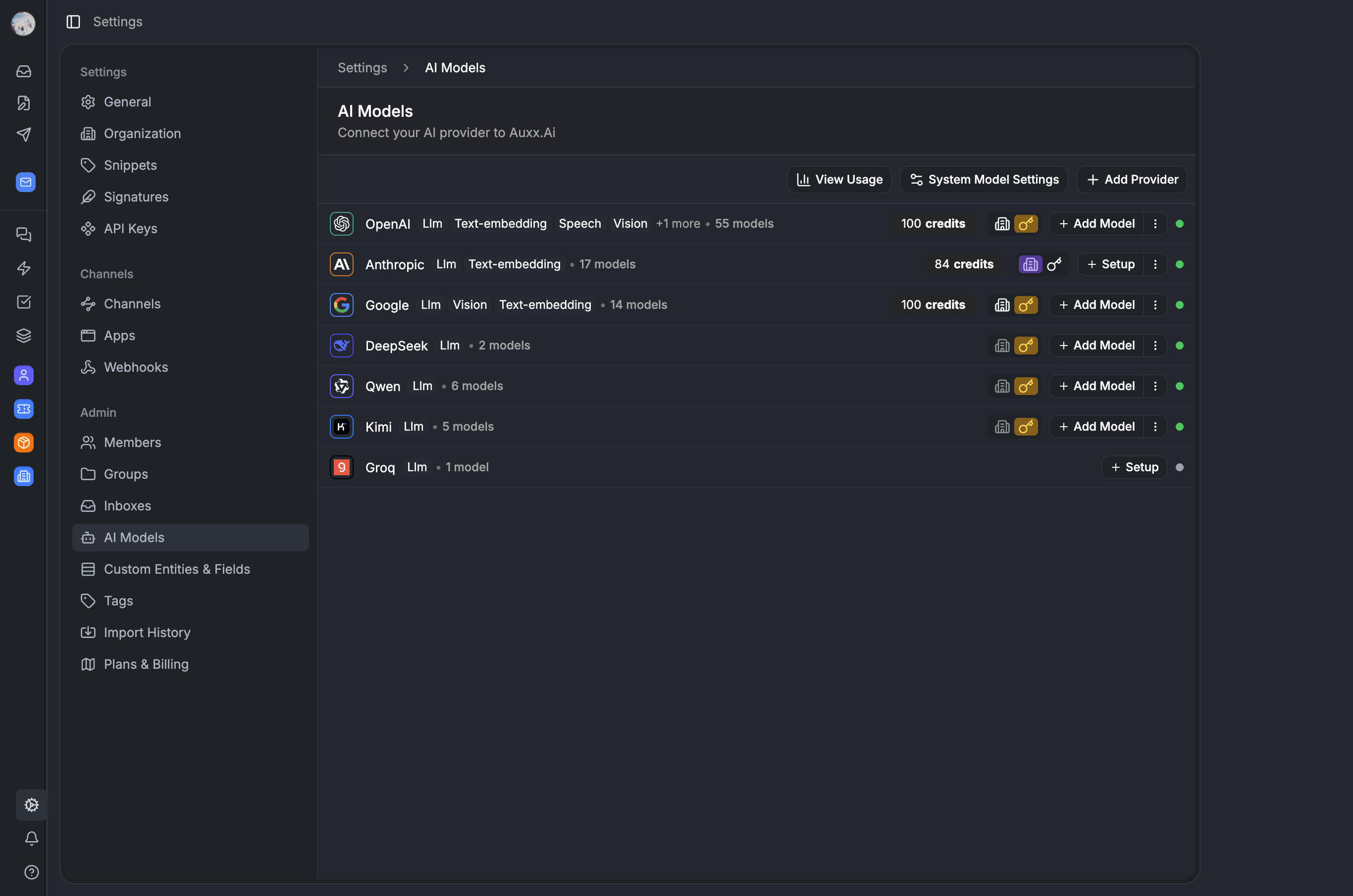

How we built a flexible AI provider system that lets organizations choose between platform-managed credits and their own API keys — from registry design to credential resolution.
Why not just hardcode an API key?
Auxx.ai uses AI everywhere. Composing ticket replies, running workflow automations, generating training datasets, powering the copilot chat. Early on we had one OpenAI key in an env var and called it a day.
Then customers started asking: "can I use Claude instead?", "can I bring my own key so I'm not capped?", "I need GPT-4 for compliance reasons." We needed a system that could handle multiple providers, let organizations choose between platform credits and their own API keys, and route credentials correctly on every AI call.
This post covers the provider registry, the SYSTEM vs CUSTOM credential model, and the routing logic that picks the right key for every invocation. Part 2 covers credits, quotas, and usage tracking.
The provider registry — a static model catalog
The ProviderRegistry is the single source of truth for what providers and models exist. It's a static class that combines model metadata from seven providers into one lookup table.
// packages/lib/src/ai/providers/provider-registry.ts

export class ProviderRegistry {
  private static models: Record<string, ModelCapabilities> = {
    ...OPENAI_MODELS,
    ...ANTHROPIC_MODELS,
    ...GOOGLE_MODELS,
    ...GROQ_MODELS,
    ...DEEPSEEK_MODELS,
    ...QWEN_MODELS,
    ...KIMI_MODELS,
  }

  private static staticProviders: Record<string, ProviderCapabilities> = {
    openai: OPENAI_CAPABILITIES,
    anthropic: ANTHROPIC_CAPABILITIES,
    google: GOOGLE_CAPABILITIES,
    groq: GROQ_CAPABILITIES,
    deepseek: DEEPSEEK_CAPABILITIES,
    qwen: QWEN_CAPABILITIES,
    kimi: KIMI_CAPABILITIES,
  }
}
Each model gets a capabilities record:
// packages/lib/src/ai/providers/types.ts

interface ModelCapabilities {
  provider: string            // "openai", "anthropic"
  modelId: string             // "gpt-4o", "claude-sonnet-4-20250514"
  displayName: string
  contextLength: number
  maxTokens: number
  modelType: ModelType        // 'llm' | 'text-embedding' | 'rerank' | 'tts' | ...
  features: string[]          // ['chat', 'streaming', 'vision', 'tool_calling']
  supports: {
    streaming: boolean
    structured: boolean
    vision: boolean
    toolCalling: boolean
    systemMessages: boolean
    fileInput: boolean
  }
  costPer1kTokens?: { input: number; output: number }
  parameterRestrictions?: {
    unsupportedParams?: string[]
    isReasoningModel?: boolean
    // ...
  }
}
The important thing here is what the registry doesn't know. It knows nothing about credentials, quotas, or organization preferences. Those are separate layers. Adding a new model is a registry change. Changing who pays for it is a configuration change. They don't touch each other.
Two-stage loading
The registry uses a two-stage loading pattern. Model metadata (capabilities, context lengths, feature flags) is imported statically — available in any environment, including the browser. Provider client classes (the actual SDK wrappers that make API calls) are loaded dynamically and only on the server:
// Server-only loader map — string literals keep the bundler happy
const serverLoaders: Record<string, () => Promise<any>> = {
  openai: () => import('./openai'),
  anthropic: () => import('./anthropic'),
  google: () => import('./google'),
  groq: () => import('./groq'),
  deepseek: () => import('./deepseek'),
  qwen: () => import('./qwen'),
  kimi: () => import('./kimi'),
}
On initialization, the registry loads each provider's client class via dynamic import. If it's running in the browser or edge runtime, it skips client loading entirely — you can still read model capabilities, you just can't make API calls.
private static isServerEnvironment(): boolean {
  const inBrowser = typeof window !== 'undefined'
  const inEdge = typeof process !== 'undefined' && process.env.NEXT_RUNTIME === 'edge'
  const inNode = typeof process !== 'undefined' && !!process.versions?.node
  return !inBrowser && !inEdge && inNode
}
This matters because the same ProviderRegistry import works in a React component (to show model options in a dropdown) and in a worker process (to actually call the model). No separate client-safe exports needed for the registry itself.
Model lifecycle guards
Models get deprecated and retired. Rather than silently failing when someone calls a model that no longer exists, the registry validates before every API call:
static assertModelNotRetired(modelId: string): void {
  const capabilities = ProviderRegistry.models[modelId]
  if (capabilities?.retired) {
    const replacement = capabilities.replacement
      ? ` Please switch to "${capabilities.replacement}".`
      : ''
    throw new ProviderError(
      `Model "${modelId}" has been retired and is no longer available.${replacement}`,
      capabilities.provider,
      'MODEL_RETIRED'
    )
  }
}
This runs in the orchestrator before every invocation. When OpenAI retires a model, we set retired: true and optionally point to a replacement. Orgs using that model get a clear error with a migration path.
SYSTEM vs CUSTOM — the core abstraction
This is the design decision that makes "credits vs own keys" work. Every provider configuration has a type: SYSTEM or CUSTOM.
// packages/lib/src/ai/providers/types.ts

enum ProviderType {
  SYSTEM = 'SYSTEM',
  CUSTOM = 'CUSTOM',
}
SYSTEM means the platform provides the credentials. The org uses credits from their subscription plan. We manage the API keys, rotation, and rate limits.
CUSTOM means the org brought their own API key. No credits involved. They pay their provider directly. Unlimited usage from our perspective.
The database design
// packages/database/src/db/schema/provider-configuration.ts

export const ProviderConfiguration = pgTable(
  'ProviderConfiguration',
  {
    id: text().$defaultFn(() => createId()).primaryKey().notNull(),
    createdAt: timestamp({ precision: 3 }).defaultNow().notNull(),
    updatedAt: timestamp({ precision: 3 }).notNull(),
    organizationId: text().notNull()
      .references(() => Organization.id, { onDelete: 'cascade' }),
    provider: text().notNull(),             // "openai", "anthropic"
    providerType: text().notNull(),         // "SYSTEM" or "CUSTOM"
    credentials: jsonb(),                   // Encrypted API keys
    isEnabled: boolean().default(true).notNull(),

    // Quota fields — only meaningful for SYSTEM type
    quotaType: text(),                      // "paid", "free", "trial"
    quotaLimit: integer().default(sql`'-1'`).notNull(),
    quotaUsed: integer().default(0).notNull(),
    quotaPeriodStart: timestamp({ precision: 3 }),
    quotaPeriodEnd: timestamp({ precision: 3 }),
  },
  (table) => [
    uniqueIndex('ProviderConfiguration_org_provider_type_key').using(
      'btree',
      table.organizationId.asc().nullsLast(),
      table.provider.asc().nullsLast(),
      table.providerType.asc().nullsLast()
    ),
  ]
)
The key insight is the unique constraint: (organizationId, provider, providerType). An org can have both a SYSTEM record and a CUSTOM record for the same provider simultaneously. The SYSTEM record tracks their credit quota. The CUSTOM record stores their API key. Switching between credits and own keys doesn't destroy either configuration.
Quota fields live directly on the configuration row, not in a separate table. The hot path — "check quota, get credentials" — hits one row.
The preference layer
A separate table tracks which type the org is currently using:
// packages/database/src/db/schema/provider-preference.ts

export const ProviderPreference = pgTable(
  'ProviderPreference',
  {
    id: text().$defaultFn(() => createId()).primaryKey().notNull(),
    createdAt: timestamp({ precision: 3 }).defaultNow().notNull(),
    updatedAt: timestamp({ precision: 3 }).notNull(),
    organizationId: text().notNull()
      .references(() => Organization.id, { onDelete: 'cascade' }),
    provider: text().notNull(),
    preferredType: text().notNull(),        // "SYSTEM" or "CUSTOM"
  },
  (table) => [
    uniqueIndex('ProviderPreference_organizationId_provider_key').using(
      'btree',
      table.organizationId.asc().nullsLast(),
      table.provider.asc().nullsLast()
    ),
  ]
)
One row per org/provider pair. Switching from credits to own keys is a single upsert:
// packages/lib/src/ai/providers/provider-configuration-service.ts

async switchProviderType(provider: string, providerType: ProviderType): Promise<void> {
  const now = new Date()
  await this.db
    .insert(schema.ProviderPreference)
    .values({
      organizationId: this.organizationId,
      provider,
      preferredType: providerType,
      updatedAt: now,
    })
    .onConflictDoUpdate({
      target: [schema.ProviderPreference.organizationId, schema.ProviderPreference.provider],
      set: {
        preferredType: providerType,
        updatedAt: now,
      },
    })
}
The underlying SYSTEM and CUSTOM configuration records stay intact. Switch to CUSTOM, use your key for a month, switch back to SYSTEM — your credits are right where you left them.
Credential resolution — the fallback chain
This is the critical path. Every AI call runs through getCurrentCredentials(). It's around 100 lines but the logic is straightforward:
// packages/lib/src/ai/providers/provider-configuration-service.ts

async getCurrentCredentials(
  provider: string,
  model: string | null,
  modelType: ModelType | null
): Promise<CredentialsResponse> {
  const config = await this.getProviderConfiguration(provider)
  let credentials: Record<string, any> | null = null
  let credentialSource: 'SYSTEM' | 'CUSTOM' | 'MODEL_SPECIFIC' | 'LOAD_BALANCED' = 'CUSTOM'

  if (config.usingProviderType === ProviderType.SYSTEM) {
    // Platform credits — single credential source
    credentials = config.systemConfiguration.credentials || null
    credentialSource = 'SYSTEM'
  } else {
    // Custom provider — three-tier fallback
    if (!model || !modelType) {
      // Provider mode: return provider-level credentials
      credentials = config.customConfiguration.provider?.credentials || null
      credentialSource = 'CUSTOM'
    } else {
      // Model mode: try model-specific → load balanced → provider-level
      const modelConfig = config.customConfiguration.models.find(
        (m) => m.model === model && m.modelType === modelType
      )

      if (modelConfig?.credentials) {
        credentials = modelConfig.credentials
        credentialSource = 'MODEL_SPECIFIC'
      } else {
        const modelSettings = config.modelSettings.find(
          (ms) => ms.model === model && ms.modelType === modelType
        )
        if (modelSettings && modelSettings.loadBalancingConfigs.length > 1) {
          credentialSource = 'LOAD_BALANCED'
        } else {
          credentialSource = 'CUSTOM'
        }
        credentials = config.customConfiguration.provider?.credentials || null
      }
    }
  }

  return {
    credentials: credentials || {},
    providerType: config.usingProviderType === ProviderType.SYSTEM ? 'SYSTEM' : 'CUSTOM',
    credentialSource,
  }
}
For SYSTEM providers, it's simple — return the platform credentials.
For CUSTOM providers, there's a three-tier fallback:
- Model-specific credentials. If you configured a dedicated API key for GPT-4o, use that.
- Load-balanced credentials. If you set up multiple keys for one model (for rate limit distribution), flag it as load-balanced.
- Provider-level credentials. The fallback — one key for all models from that provider.
Why three tiers?
Most orgs use tier 3 — one API key per provider. Simple. But some orgs need more:
- Billing separation. Different keys for different models, charged to different cost centers.
- Rate limit isolation. A dedicated key for the high-volume workflow model, separate from the interactive copilot.
- Load balancing. High-volume orgs hit rate limits on a single key. Multiple keys with round-robin distribution.
The three tiers handle all of these without separate code paths. The fallback chain just resolves to whichever tier is configured.
Credential source tracking
The credentialSource field isn't just metadata. It flows all the way through the invocation into the usage tracking table:
type CredentialSource = 'SYSTEM' | 'CUSTOM' | 'MODEL_SPECIFIC' | 'LOAD_BALANCED'This means orgs with complex setups can see exactly which credential was used for every AI call. Useful for debugging rate limit issues or auditing per-key spend.
Model-level configuration
Beyond the provider-level setup, orgs can configure individual models:
// packages/database/src/db/schema/model-configuration.ts

export const ModelConfiguration = pgTable(
  'ModelConfiguration',
  {
    id: text().$defaultFn(() => createId()).primaryKey().notNull(),
    organizationId: text().notNull()
      .references(() => Organization.id, { onDelete: 'cascade' }),
    provider: text().notNull(),
    model: text().notNull(),
    modelType: text().default('llm').notNull(),
    enabled: boolean().default(true).notNull(),
    config: jsonb().default({}).notNull(),
    credentials: jsonb(),                   // Model-specific API key (encrypted)
  },
  (table) => [
    uniqueIndex('ModelConfiguration_organizationId_provider_model_modelType_key').using(
      'btree',
      table.organizationId.asc().nullsLast(),
      table.provider.asc().nullsLast(),
      table.model.asc().nullsLast(),
      table.modelType.asc().nullsLast()
    ),
  ]
)
This is where model-specific API keys live. The unique constraint on (org, provider, model, modelType) means each model gets exactly one configuration record. Toggle specific models on/off, attach dedicated credentials, store model-specific parameters — all per model.
Organization model defaults
Decoupled from credentials entirely, each org picks default models per task type:
// packages/lib/src/ai/providers/system-model-service.ts

export class SystemModelService {
  constructor(
    private db: Database,
    private organizationId: string
  ) {}

  async setDefault(modelType: ModelType, provider: string, model: string): Promise<void> {
    const now = new Date()
    await this.db
      .insert(schema.SystemModelDefault)
      .values({
        organizationId: this.organizationId,
        modelType,
        provider,
        model,
        updatedAt: now,
      })
      .onConflictDoUpdate({
        target: [schema.SystemModelDefault.organizationId, schema.SystemModelDefault.modelType],
        set: { provider, model, updatedAt: now },
      })
  }
}
An org can set "use Claude Sonnet for LLM tasks" and "use OpenAI for embeddings" — the credential configuration determines whether those calls use platform credits or their own keys. Model choice and payment method are independent decisions.
The ModelType enum covers seven task categories:
enum ModelType {
  LLM = 'llm',
  TEXT_EMBEDDING = 'text-embedding',
  RERANK = 'rerank',
  TTS = 'tts',
  SPEECH2TEXT = 'speech2text',
  MODERATION = 'moderation',
  VISION = 'vision',
}
Credential security
Provider credentials are encrypted at rest using AES-256-GCM via our @auxx/credentials package. In the database, they look like { _encrypted: "base64..." }. Decrypted on retrieval, never logged, and never exposed in API responses — the tRPC layer replaces actual values with __HIDDEN__ before sending to the frontend.
SYSTEM credentials have their own resolution chain: database secrets first, then environment variables, then SST Resources. This lets us rotate platform keys without database migrations.
Implicit mode switching
One design decision worth calling out: saving custom credentials automatically switches the org to CUSTOM mode. Deleting them switches back to SYSTEM. Users don't manually toggle between modes — the preference layer is managed as a side effect of credential changes.
From the tRPC router's perspective, saveProviderConfiguration does two things in one call:
- Validates and encrypts the API key
- Calls
switchProviderType(provider, ProviderType.CUSTOM)
And deleteProviderConfiguration reverses both:
- Removes the CUSTOM configuration record
- Falls back to SYSTEM (with whatever credits remain)
This means the settings UI doesn't need a separate "use credits / use own key" toggle. Add a key → you're on your key. Remove it → you're back on credits.
The caching layer
The ProviderManager wraps ProviderConfigurationService with a 4-stage cache:
local memory → Redis hash → Redis data → compute from DB
Cache keys are scoped by organization:
aiProviderConfigs— all provider configurations for the orgaiCredentials— credential map keyed byprovider:model:modelTypeaiDefaultModels— organization default model selections
Every mutation (save credentials, delete provider, toggle model) fires a cache event that invalidates the relevant keys. This ensures the next AI call picks up configuration changes within seconds, not minutes.
The architecture stack
Here's how the layers compose:
LLM Orchestrator          → entry point for all AI calls
  ↓
ProviderManager           → cache + service wrapper
  ↓
ProviderConfigurationService → core business logic, DB operations
  ↓
ProviderRegistry          → static metadata + dynamic client factory
  ↓
Database                  → Drizzle ORM with encrypted credentials
Each layer has a single responsibility. The orchestrator doesn't know about caching. The manager doesn't know about credential fallback chains. The configuration service doesn't know about model capabilities. They compose cleanly.
Key trade-offs
| Decision | Trade-off | Why we chose it |
|---|---|---|
| Separate SYSTEM/CUSTOM rows per provider | More rows in the DB | Switching modes preserves both configurations |
| Three-tier credential fallback | Resolution complexity on every call | Covers simple (one key) to advanced (per-model load balancing) |
| Credential source tracking | Extra column on every usage row | Enables per-credential analytics and billing attribution |
| Static registry + dynamic config | Two layers to understand | Adding models doesn't touch org configs, changing credentials doesn't touch model metadata |
| Only OpenAI and Anthropic support SYSTEM | Limits platform coverage | Fewer platform keys to manage and rotate |
| Quota fields on config row | Denormalized | Single-row lookup for the hot path |
| Implicit mode switching | Less explicit user control | Simpler UX — add key means use key, remove means use credits |
Next up
Part 2 covers the other half: how credits work (1 invocation = 1 credit), quota lifecycle tied to Stripe subscriptions, per-invocation usage tracking with source attribution, and the LLM orchestrator that ties credential routing to usage tracking in a single flow.