Building Your Own App Store from Scratch (Part 1): Schema, SDK, and the Security Model
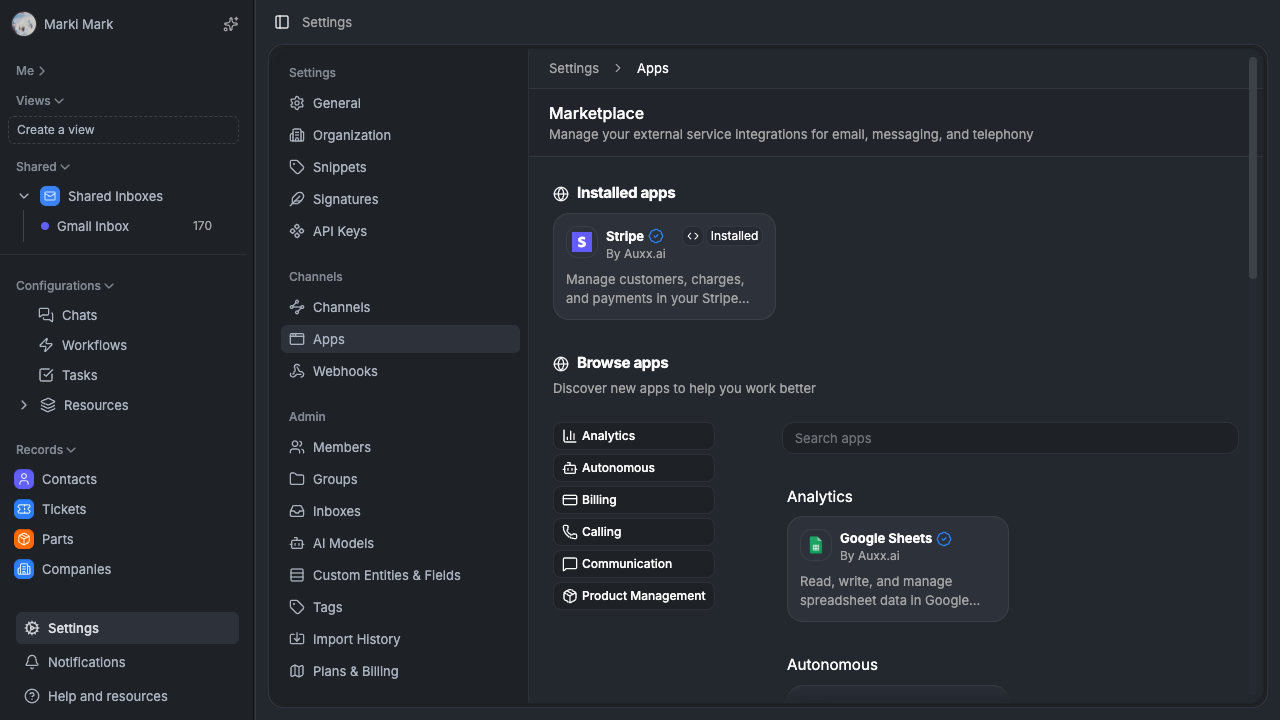

How we designed the database schema, developer SDK, and iframe sandboxing system that powers the Auxx.ai app marketplace — immutable deployments, build-time schema extraction, and a custom React reconciler over PostMessage.
Why build an app store?
Auxx.ai is a customer support platform. Every business uses different tools — different CRMs, shipping providers, payment processors, phone systems. You cant build every integration yourself. And the alternative — a pile of if-statements and feature flags — doesnt scale.
What we needed was a way for developers (including ourselves) to define integrations as self-contained packages. Each package has its own settings, connections, UI widgets, and workflow blocks. Install it, configure it, done.
This isnt an app marketplace tutorial. Its a walkthrough of the system we actually built and the decisions behind it. Real schema, real code, real trade-offs.
This is part 1 of a 3-part series. This post covers the data model, the SDK, and the security model. Part 2 covers the developer portal. Part 3 covers how apps actually run inside the platform at runtime.
The data model — 7 tables that power everything
The core schema lives in packages/database/src/db/schema/. Here are the tables and why each one exists.
App — the catalog entry
This is the marketplace listing. It has a unique slug, display fields (title, description, category, avatarUrl), and marketplace content fields for the detail page (overview, contentHowItWorks, contentConfigure).
A few fields worth calling out:
publicationStatus— draft or published. Controls marketplace visibility.reviewStatus— tracks the review pipeline for submitted apps.hasOauthandoauthApplicationId— if the app needs OAuth, this links to its OAuth config.hasBundle— whether the app ships client/server code bundles.- Every app belongs to a
DeveloperAccount(more on that in part 2).
AppDeployment — immutable code snapshots
This is the most important design decision in the whole system. Deployments are immutable. You never update a deployment — you create a new one.
Each deployment is a frozen version of the app's code and config:
{
  deploymentType: 'development' | 'production',
  version: '1.2.0',              // semver for production
  clientBundleId: string,        // → AppBundle
  serverBundleId: string,        // → AppBundle
  settingsSchema: JSON,          // extracted at build time
  environmentVariables: JSON,
  targetOrganizationId?: string, // dev deployments are org-scoped
}
The status lifecycle for production deployments: active → pending-review → in-review → approved → rejected → published → deprecated.
Why immutable? Same reason Docker images are immutable. You can always roll back. You can always audit what code was running at any point. Installations reference a specific snapshot — no surprises from hot-patching.
AppBundle — content-addressed code storage
Bundles store compiled JavaScript. Each bundle has a bundleType (client or server), a sha256 content hash, and sizeBytes for quota tracking.
The unique constraint is on (appId, bundleType, sha256) — the same code is never stored twice. Same idea as git objects. If a developer deploys a new version but only changed the server code, the client bundle just references the existing hash.
AppInstallation — the link between app and organization
When an org installs an app, this record gets created. It links appId + organizationId + installationType (dev or prod) and tracks which deployment is currently active via currentDeploymentId.
Uninstalls are soft deletes — an uninstalledAt timestamp. This preserves the installation history and settings for reinstalls. One installation per app/org/type combo.
AppSetting — per-installation configuration
Key-value pairs scoped to an installation. appInstallationId + key → value (JSON). Also references appDeploymentId for version tracking, because settings schemas can change between deployments.
Settings are defined by the SDK schema and validated server-side with Zod. More on that later.
DeveloperAccount — publisher identity
Every app has a publisher. Developer accounts have a slug, title, logoUrl, and feature flags for granular access control. Members are tracked via a DeveloperAccountMember join table with role-based access.
AppWebhookHandler — webhook routing
External services dont know about Auxx's multi-tenant model. When Shopify or Stripe sends a webhook, AppWebhookHandler maps a public URL to the right app installation, trigger, and workflow. One table replaces what would otherwise be per-integration webhook routing logic.
The SDK — how developers define apps
The SDK (packages/sdk/) gives developers a typed interface to define what their app does. No inheritance, no registration API — just a typed object.
The app entry point
Every app has a src/app.ts (or src/app.tsx) that exports an object conforming to the App interface:
interface App {
  record?: {
    actions?: RecordAction[]
    bulkActions?: BulkRecordAction[]
    widgets?: RecordWidget[]
  }
  callRecording?: {
    insight?: { textActions: string[] }
    summary?: { textActions?: string[] }
    transcript?: { textActions: string[] }
  }
  workflow?: {
    blocks?: WorkflowBlock[]
    triggers?: WorkflowTrigger[]
  }
  quickActions?: QuickAction[]
  settings?: {
    organization?: ScopedSettingsSchema
  }
}
This single interface defines every surface an app can extend. Record actions, bulk actions, widgets, workflow blocks, workflow triggers, quick actions, and settings. A developer looks at this and immediately knows what's possible.
The settings schema
Apps define their settings in app.settings.ts using typed schema builders:
string()   // text input — minLength, maxLength, pattern, placeholder
number()   // number input — min, max, step
boolean()  // toggle
select()   // dropdown with typed options
struct()   // nested grouping
Settings are scoped to organization (managed by admins) or user (per-person preferences). The schema gets extracted at build time — the CLI compiles the TypeScript, does a dynamic import, reads the schema object, and serializes it to JSON. That JSON gets stored in AppDeployment.settingsSchema.
Why extract at build time instead of runtime? Because runtime evaluation would mean trusting developer code to produce consistent output every time. Build-time extraction locks the schema to the deployment. The schema is data, not code. No surprises.
The security model — React inside an iframe, talking via messages
This is the part most people wouldnt expect. The SDK ships its own React. Not React DOM — a custom React reconciler that serializes component trees to JSON and sends them over PostMessage to the platform.
Why?
Third-party app code runs inside a sandboxed iframe. It cant touch the platform's DOM. It cant import the platform's components. It cant call the platform's APIs directly. The only communication channel is window.postMessage.
So the question becomes: how do you let developers write React components that render inside the platform's UI, without giving them access to the platform?
The answer: serialize React, dont share it.
How the reconciler works
The SDK includes react-reconciler — the same low-level package React DOM and React Native are built on. But instead of rendering to DOM nodes, our host config renders to plain JSON objects:
// Developer writes normal React in their app:
<Form onSubmit={handleSubmit}>
  <Input label="API Key" name="apiKey" />
  <Button type="submit">Save</Button>
</Form>

// The reconciler serializes this to JSON:
{
  component: 'Form',
  props: { onSubmit: 'handler_1' },
  children: [
    { component: 'Input', props: { label: 'API Key', name: 'apiKey' } },
    { component: 'Button', props: { type: 'submit' }, children: ['Save'] }
  ]
}
Event handlers cant be serialized, so they get assigned IDs. When the platform-side component fires an event, it sends a PostMessage back to the iframe with the handler ID, and the reconciler calls the original function. The developer never knows any of this is happening — they just write React.
The PostMessage protocol
Every message has a source field ('auxx-platform' or 'auxx-extension'), an appId, and an appInstallationId. Both sides validate all three before processing anything.
Platform → Extension:
trigger-surface— the user clicked your action button, here's the contextevent-handler-call— a handler with this ID was invoked, here are the argsrun-server-function-result— here's the return value from your server function
Extension → Platform:
render-component— here's my serialized React tree, render itrun-server-function— call this server function with these argsopen-dialog/close-dialog— show/hide a modalset-surfaces— here are the actions, widgets, and triggers I provide
Every request gets a unique requestId. The sender stores a promise keyed by that ID. When the response comes back, the promise resolves. 30-second timeout on everything — if something hangs, it fails cleanly instead of blocking forever.
Origin validation — both directions
The platform only accepts messages from the iframe's origin:
const allowedOrigins = [window.location.origin]
if (this.apiUrl) allowedOrigins.push(new URL(this.apiUrl).origin)

if (!allowedOrigins.includes(event.origin)) return
if (event.data.source !== 'auxx-extension') return
if (event.data.appId !== this.appId) return
The iframe only accepts messages from the platform's origin (passed via URL param at load time):
if (this.webAppOrigin && event.origin !== this.webAppOrigin) return
if (event.data.source !== 'auxx-platform') return
if (event.data.appId !== this.appId) return
When sending, both sides specify the target origin explicitly — never '*'.
Component whitelist
The serialized React tree references component names like 'Form', 'Button', 'Input'. On the platform side, component-registry.tsx maps these names to real platform components. If a name isnt in the registry, it throws:
const Component = getComponent(component)
if (!Component) {
  throw new Error(`Extension attempted to use unauthorized component: "${component}"`)
}
Apps get about 20 safe UI components: Form, Input, Button, Select, Label, Card, Badge, Textarea, Checkbox, and some workflow-specific components. No DOM access, no dangerouslySetInnerHTML, no arbitrary rendering.
Server/client bundle separation
Files named *.server.ts are automatically stripped from the client bundle by a build plugin. In their place, the plugin generates a proxy that sends a PostMessage to the platform, which then executes the real server function via an authenticated API route:
// Developer writes: handlers/email.server.ts
export async function sendEmail(to: string, body: string) {
  const connection = await getConnection('email')
  await connection.send(to, body)
}

// Client bundle gets a proxy instead:
export async function sendEmail(...args) {
  return Host.sendRequest('run-server-function', {
    moduleHash: 'handlers/email.server#sendEmail',
    args: JSON.stringify(args)
  })
}
The server function executes through a Next.js API route that validates the user session, checks org permissions, and verifies the app installation is active — all before running any app code. Connection credentials (OAuth tokens, API keys) are injected server-side and never sent to the iframe.
The sandbox itself
The iframe gets exactly two sandbox permissions:
iframe.sandbox.add('allow-scripts', 'allow-same-origin')Scripts can run, same-origin storage works. Everything else is blocked — no form submissions, no navigation, no popups, no plugins, no top-level navigation. The app's entire world is: run JavaScript, send PostMessages, get PostMessages back.
Why this approach matters
Most app platforms pick one of two approaches:
- Server-side only (Shopify Functions, Cloudflare Workers) — apps cant render UI
- Full DOM access (Chrome extensions, some WordPress plugins) — apps can do anything, including steal data
We wanted a third option: apps can render rich UI inside the platform, but they never touch the DOM directly. The React reconciler bridges the gap — developers write normal components, the SDK serializes them, the platform renders them safely.
The iframe sandbox + PostMessage protocol + component whitelist means even a malicious app cant:
- Read other apps' messages (appId validation on every message)
- Access the platform's DOM (iframe sandbox)
- Render arbitrary HTML (component whitelist)
- Call server functions without auth (API route validation)
- Access credentials in the browser (server-side injection only)
Its defense in depth. Any single layer could theoretically be bypassed. All of them together — thats the point.
App lifecycle — from code to marketplace
Creation
- Developer creates a
DeveloperAccountin the build portal - Creates an app — gets a slug, fills in metadata
- Writes
app.ts+app.settings.tsusing the SDK
Development
- CLI builds the app: compiles TypeScript, extracts settings schema, bundles client/server code
- Creates an
AppDeploymentwith typedevelopmentandtargetOrganizationId - Bundles uploaded to
AppBundlewith content hashes - Only the target org can see and install the dev deployment
Review and publishing
- Developer submits for review → status becomes
pending-review - Admin reviews →
approvedorrejected(with reason) - Approved deployments can be published → visible to all organizations
autoApproveflag skips review for trusted developers
Installation
- Org browses the marketplace or dev deployments
- Admin installs → creates
AppInstallationlinking to a specific deployment - Org configures settings via the auto-generated form
- App is live — its workflow blocks, triggers, and UI surfaces become available
Publication validation
Before an app can be submitted for review, the build portal validates completeness:
- Category must be set
- Description must exist (100+ characters)
- Overview content filled in
- If OAuth enabled: OAuth config must be complete
- If connections defined: connection definitions must be valid
- Screenshots and marketplace images recommended
This isnt just UI validation — publish-checks.ts runs the same checks server-side. The form can be wrong. The server cant be.
Wrapping up part 1
The foundation of the app store is three things: an immutable deployment model (same pattern Docker uses), a build-time schema extraction system (settings are data, not code), and a custom React reconciler over PostMessage (rich UI without security trade-offs).
In part 2, well cover the developer portal — apps/build, the standalone Next.js app where developers manage their apps, teams, and deployments.
Auxx.ai is open source. PRs welcome.