Building a Visual Workflow Engine (Part 1): The Editor
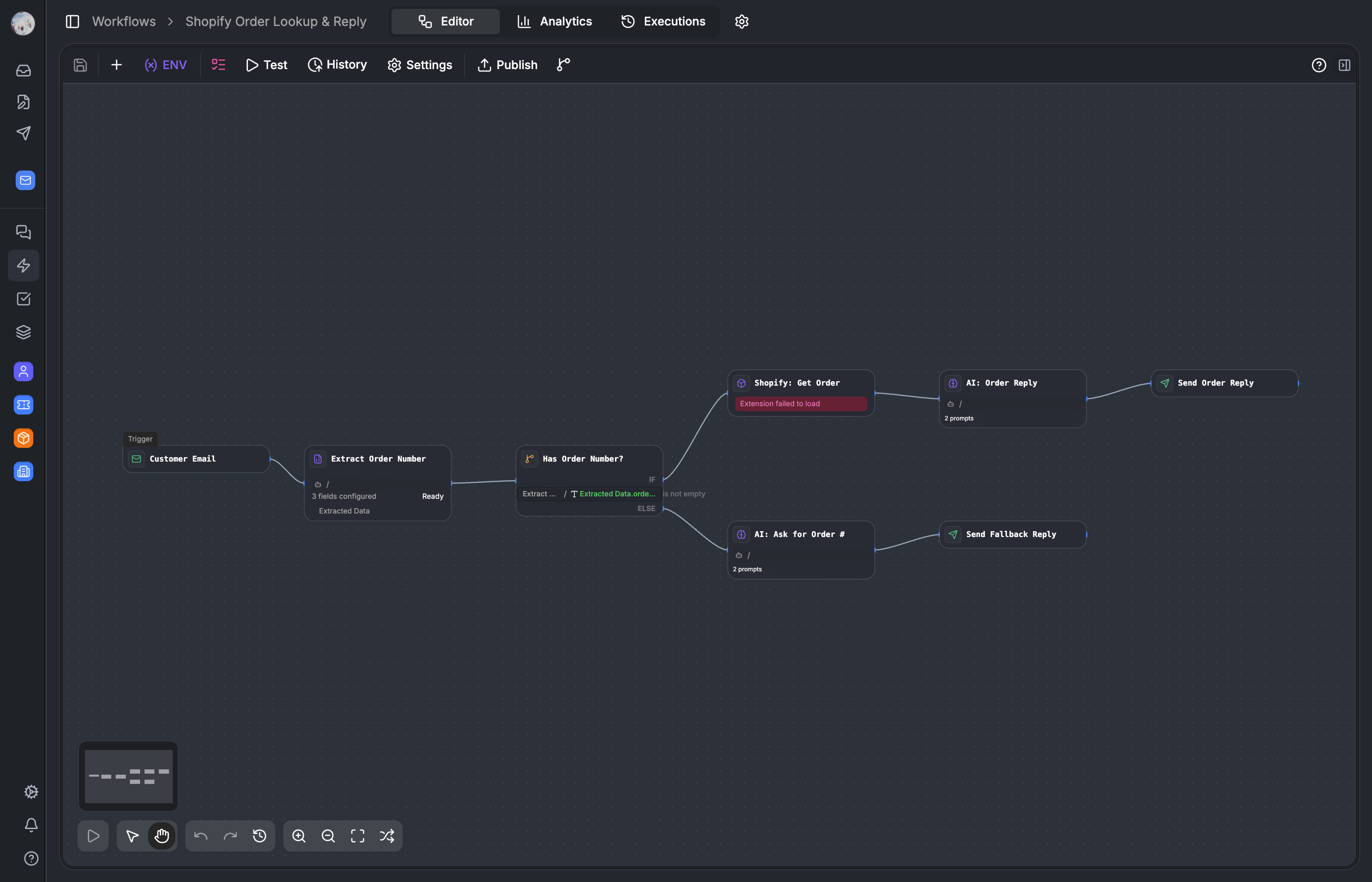

How we built a React Flow-based visual workflow editor with 30+ node types, a unified registry, 12 Zustand stores, snapshot-based undo/redo, and debounced auto-save with a sendBeacon fallback.
Workflows are the core of Auxx.ai. They define how tickets get routed, how AI drafts replies, how Shopify orders get looked up, and how escalations happen. Every automation a customer sets up is a workflow — a visual graph of nodes and edges that compiles to JSON and runs on our execution engine.
This is part 1 of a 3-part series on how we built the workflow system from scratch. This post covers the visual editor. Part 2 covers the execution engine — the while-loop that takes the JSON graph and runs it. Part 3 covers AI nodes, tool use, and how workflows get published as public APIs and web forms.
Why build a custom workflow editor?
We evaluated existing workflow builders early on — n8n embed, Retool Workflows, a few others. They all had the same problem: they either couldnt support our entity model (custom fields, dynamic entity types, org-scoped resources), couldnt embed cleanly in our SaaS, or locked us into their execution runtime.
What we needed was a visual editor that produces a JSON graph and an execution engine that consumes it. The editor and engine are completely decoupled — the graph is the contract between them. You could swap either side independently.
We chose React Flow as the foundation. Its the most mature graph visualization library for React, it handles viewport management and node rendering out of the box, and it gives you enough hooks to override everything we needed to customize.
The component architecture — provider soup
The workflow editor is a deeply nested component tree. Heres the actual nesting order:
// apps/web/src/components/workflow/editor/workflow-editor.tsx

WorkflowEditor                        // outer shell — loads data, shows skeleton
  └── ReactFlowProvider               // @xyflow/react context
        └── WorkflowResourceProvider   // loads apps, entity definitions
              └── VarStoreSyncProvider  // syncs variable store with node state
                    └── WorkflowEditorProvider  // calls setupNodeRegistry()
                          └── WorkflowStoreProvider  // initializes Zustand stores
                                └── WorkflowHistoryProvider
                                      └── WorkflowEditorInner
Seven nested providers looks like a lot. Each one has a clear reason to exist.
ReactFlowProvider must wrap everything that calls useReactFlow() — thats a React Flow requirement, not a choice. WorkflowResourceProvider loads external app definitions (Shopify blocks, Slack actions, etc.) before the node registry initializes — without it, the block selector would render empty on first load. VarStoreSyncProvider keeps the variable picker in sync with node outputs as they change. When you add an AI node, its output variables immediately appear in the variable picker of downstream nodes.
The most important one is WorkflowStoreProvider. It resets all 12 Zustand stores when the workflow ID changes. Without this, switching between workflows would leak state — youd see the previous workflows undo history, run results, and panel state.
WorkflowEditorProvider calls setupNodeRegistry() on mount, which populates the UnifiedNodeRegistry singleton with all core node definitions. App nodes load asynchronously after mount and the registry emits subscription events when they arrive.
The inner WorkflowEditorInner component renders the actual UI:
// apps/web/src/components/workflow/editor/workflow-editor.tsx

function WorkflowEditorInner() {
  return (
    <>
      <WorkflowKeyboardShortcuts />    {/* renders null, hooks only */}
      <WorkflowToolbar />              {/* top bar: save, publish, settings */}
      <WorkflowCanvas />               {/* React Flow lives here */}
      {showPropertyPanel && <PropertyPanel />}
      {showRunPanel && <WorkflowRunPanel />}
      {showSettingsPanel && <WorkflowSettingsPanel />}
    </>
  )
}
The unified node registry
The registry is the single map that connects node types to their UI components, property panels, validation schemas, and metadata. Its a global singleton with reactive subscriptions.
// apps/web/src/components/workflow/nodes/unified-registry.ts

class UnifiedNodeRegistry {
  private nodes = new Map<string, NodeDefinition>()
  private subscribers = new Set<() => void>()

  register(definition: NodeDefinition): void {
    this.nodes.set(definition.type, definition)
    this.notifySubscribers()
  }

  getComponent(type: string): React.ComponentType | undefined {
    return this.nodes.get(type)?.component
  }

  subscribe(callback: () => void): () => void {
    this.subscribers.add(callback)
    return () => this.subscribers.delete(callback)
  }
}

export const unifiedNodeRegistry = new UnifiedNodeRegistry()
React Flow only knows about two node types: standard and note. Thats it. The StandardNode component does a secondary lookup in the registry to find the actual renderer:
// apps/web/src/components/workflow/nodes/shared/base/custom-node.tsx

export const FLOW_NODE_TYPES = {
  standard: StandardNode,
  note: NoteNode,
}

function StandardNode({ data }: NodeProps) {
  const Component = unifiedNodeRegistry.getComponent(data.type)
  if (!Component) return <FallbackNode />
  return <Component {...props} />
}
For app nodes with colon-delimited types (like shopify:order_created), the registry falls back to a generic AppWorkflowNode that renders based on the apps metadata. This means third-party apps dont need to ship React components — just a JSON definition.
Each core node type is a self-contained directory:
nodes/core/ai/
  ├── node.tsx        // canvas card renderer
  ├── panel.tsx       // right sidebar property panel
  ├── schema.ts       // Zod validation schema
  ├── types.ts        // TypeScript types
  └── index.ts        // NodeDefinition export
This makes node types independently testable and keeps the registry purely declarative. Adding a new node type is: create the directory, define the NodeDefinition, register it in setupNodeRegistry().
30+ node types across 6 categories
The editor ships with over 30 built-in node types, plus dynamic app nodes:
| Category | Node Types |
|---|---|
| Trigger | message-received, webhook, scheduled, manual, resource-trigger (created/updated/deleted), app triggers |
| Condition | if-else (multi-case with AND/OR operators) |
| Action | answer, ai, find, http, crud, human-confirmation |
| Transform | code, text-classifier, information-extractor, var-assign, date-time, list, format |
| Flow | loop, wait, end |
| Data/AI | document-extractor, chunker, dataset, knowledge-retrieval |
| Input | form-input, number-input, file-upload |
| Annotation | note |
Not all of these are executable. form-input, file-upload, number-input, and note are UI-only — they configure the workflows public interface (when published as a web form) or serve as developer notes. The engine skips them entirely. More on this in Part 3.
App nodes are dynamic. Third-party app integrations (Shopify, Slack, etc.) register their own node types at runtime via the registry. The format appId:blockId lets the editor render them generically while the engine dispatches to app-specific processors.
The canvas — React Flow with custom everything
The canvas is where the graph lives. Its a standard React Flow instance with a lot of overrides.
// apps/web/src/components/workflow/canvas/workflow-canvas.tsx

<ReactFlow
  nodes={nodes}
  edges={edges}
  nodeTypes={FLOW_NODE_TYPES}
  edgeTypes={{ default: CustomEdge }}
  connectionMode={ConnectionMode.Loose}
  selectionMode={SelectionMode.Partial}
  deleteKeyCode={null}
  selectNodesOnDrag={false}
>
  <Background />
  <MiniMap />
  <Panel position="top-left">
    <EmptyTriggerButton />
    <RunInfo />
  </Panel>
  <Panel position="bottom-left">
    <WorkflowOperators />
  </Panel>
</ReactFlow>
A few of these overrides are worth explaining.
deleteKeyCode={null} disables React Flows built-in delete handling. We handle Delete and Backspace ourselves via useWorkflowShortcuts because we need to conditionally prevent deletion of trigger nodes, show confirmation dialogs for bulk deletes, and support undo after deletion. React Flows native delete doesnt support any of that.
ConnectionMode.Loose means any handle can connect to any handle. Validation happens in isValidConnection() at connect time, not at the handle level. This gives a smoother drag experience — the user can start dragging from any output and we validate when they drop.
SelectionMode.Partial combined with selectNodesOnDrag={false} means you must use the selection rectangle to multi-select. Clicking a node selects only that node and opens its property panel.
Custom edges
We use a single custom edge type for everything. CustomEdge renders adaptive paths (n8n-style routing for backward edges), status-colored gradients during execution, and two floating buttons on hover: a + to insert a node mid-edge and a trash icon to delete the edge.
// apps/web/src/components/workflow/edges/custom-edge/index.tsx

function CustomEdge({ id, source, target, sourceHandleId, ... }) {
  // Adaptive path — smooth bezier for forward edges,
  // stepped routing for backward edges (loops)
  const path = getAdaptiveEdgePath(sourcePos, targetPos, isBackward)

  // Color changes based on state:
  // - Default: neutral gray
  // - Hover/selected: blue
  // - Error branch (sourceHandleId === 'false'/'fail'): red
  // - Running: animated gradient from source to target color
  const strokeColor = getEdgeColor(status, isHovered, isSelected, sourceHandleId)

  return (
    <>
      <BaseEdge path={path} style={{ stroke: strokeColor }} />
      {isHovered && (
        <EdgeLabelRenderer>
          <AddNodeTrigger position={midpoint} />  {/* + button */}
          <DeleteButton onClick={deleteEdge} />
        </EdgeLabelRenderer>
      )}
    </>
  )
}
The + button on edges is one of those small UX decisions that makes a big difference. Instead of: delete edge → add node → reconnect edges, users just click + on the edge and pick a node. The new node is inserted between the source and target with both edges created automatically.
State management — 12 Zustand stores
This is where people usually raise an eyebrow. Twelve stores for one editor? Heres why.
| Store | Purpose |
|---|---|
useWorkflowStore | Workflow metadata, dirty flag, drag state, clipboard, context menus |
useCanvasStore | Viewport, grid settings, minimap, read-only mode, version preview |
usePanelStore | Active panel, panel stack, run panel, settings panel, width (persisted to localStorage) |
useEdgeStore | Edge state separate from React Flows internal state |
useInteractionStore | Pointer/pan mode, temporary pan (Space key hold) |
useSelectionStore | Selected node/edge IDs |
useRunStore | Execution state, per-node statuses, progress |
useSingleNodeRunStore | Per-node isolated test runs |
useVarStore | Environment variables, workflow variables |
useTestInputStore | Test input values per node |
useWebhookTestStore | Webhook test event listeners |
historyManager | Undo/redo (50-item snapshot stack) |
The reason is performance. React Flow re-renders are expensive — every node is a React component positioned absolutely in a transformed viewport. If you put all editor state in one store, a panel width resize triggers a canvas re-render. A run status update triggers a toolbar re-render. Everything re-renders on everything.
With 12 stores and Zustand selectors, a panel width change doesnt touch the canvas. A run status update doesnt touch the toolbar. Each store has a clear domain boundary:
// correct — only re-renders when markDirty changes
const markDirty = useWorkflowStore((state) => state.markDirty)

// wrong — re-renders on every state change in the store
const { markDirty } = useWorkflowStore()
The event bus
Stores dont talk to each other directly. storeEventBus is a typed pub/sub that decouples them:
// apps/web/src/components/workflow/store/event-bus.ts

type EventMap = {
  'drag:ended': { nodeId: string }
  'selection:changed': { nodeIds: string[] }
  'workflow:externalUpdate': { nodes: Node[]; edges: Edge[] }
  'node:updated': { nodeId: string; data: Partial<NodeData> }
  // ... 10+ more event types
}

class StoreEventBus {
  private listeners = new Map<string, Set<Function>>()

  on<K extends keyof EventMap>(event: K, callback: (data: EventMap[K]) => void) { ... }
  emit<K extends keyof EventMap>(event: K, data: EventMap[K]) { ... }
}

export const storeEventBus = new StoreEventBus()
When a node drag ends, the canvas emits drag:ended. The panel store listens and opens the property panel for the dragged node. Neither the canvas nor the panel store imports the other — they communicate through events.
This matters for maintainability. When you have 12 stores, direct imports between them would create a circular dependency web. The event bus keeps each store in its own file with its own concerns.
Undo/redo — snapshot-based history
The historyManager keeps a 50-item stack of { nodes, edges } snapshots. Every graph mutation (node added, node moved, edge created, node deleted) pushes a snapshot. Undo pops the stack and replaces the entire React Flow state.
// apps/web/src/components/workflow/store/history-manager.ts

class HistoryManager {
  private undoStack: GraphSnapshot[] = []
  private redoStack: GraphSnapshot[] = []
  private maxSize = 50

  push(snapshot: GraphSnapshot) {
    this.undoStack.push(snapshot)
    if (this.undoStack.length > this.maxSize) this.undoStack.shift()
    this.redoStack = []  // clear redo on new action
  }

  undo(): GraphSnapshot | null {
    const snapshot = this.undoStack.pop()
    if (snapshot) this.redoStack.push(currentSnapshot)
    return snapshot
  }
}
Undo/redo fires via the event bus. When historyManager.undo() returns a snapshot, it emits workflow:externalUpdate with the previous nodes and edges. The canvas listens and calls setNodes() / setEdges() directly on the React Flow store.
We considered command-based undo (invertible operations) but rejected it. With 30+ node types and different mutation shapes — adding a node, moving a node, connecting an edge, bulk-deleting, pasting from clipboard — defining an inverse for every operation is error-prone. Snapshotting the full graph state is simpler and provably correct. The trade-off is memory: 50 snapshots of a 100-node graph. In practice, each snapshot is a few KB of JSON. Its fine.
Interactions — drag, connect, delete
All user interactions flow through dedicated hooks that coordinate between React Flow, the stores, and the event bus.
Drag
handleNodeDragStart → sets isDragging: true (suppresses panel open during drag)
handleNodeDrag      → updates alignment helplines
handleNodeDragStop  → emits drag:ended → panel store opens property panel
                    → debouncedSave() queues a graph save
The isDragging flag is important. Without it, React Flow fires a selectionChange event during drag, which would open and close the property panel as you drag a node past other nodes. Setting isDragging: true tells the panel store to ignore selection changes until the drag ends.
Connect
When you drag from a handle to create an edge:
onConnectStarttracks theconnectingNodePayloadin the workflow store — used to highlight valid drop targetsonConnectcallshandleNodeConnect, which validates viaisValidConnection(), creates an edge withgenerateId('edge'), and setssourceType/targetTypeon the edge datadebouncedSave()triggers
Delete
Delete and Backspace are handled in useWorkflowShortcuts. The handler calls handleDeleteNode(nodeId) from useNodesInteractions, which pushes a history snapshot before removing the node so undo works.
Context menus
Right-click on a node stores { top, left, nodeId } in useWorkflowStore.nodeMenu. Right-click on the canvas stores { top, left } in useWorkflowStore.paneMenu. The context menu components render from these store values and offer actions like copy, delete, disable, and collapse.
Save — debounced auto-save with beacon fallback
This is one of the more important pieces of the editor. Users expect their work to be saved automatically. But React Flow emits onNodesChange on every pixel of a drag. A naive save-on-change would DDoS your own API.
// apps/web/src/components/workflow/hooks/use-workflow-save.ts

const DEBOUNCE_MS = 5000

// pending changes accumulate between saves
const pendingRef = useRef<PendingChanges>({
  graph: null,
  name: null,
  description: null,
  icon: null,
  webEnabled: null,
  apiEnabled: null,
  accessMode: null,
  config: null,
  rateLimit: null,
  envVars: null,
})
Three save triggers:
- Debounced auto-save — 5 seconds after the last change. If you rename the workflow, move a node, and change an env var within 5 seconds, all three changes merge into one
api.workflow.updatecall - Immediate save —
Cmd+Scancels the debounce and fires immediately - Page-close save —
navigator.sendBeacon()onvisibilitychangeandbeforeunload
The sendBeacon fallback is critical. The number of users who close a tab mid-edit is non-trivial. sendBeacon fires a POST with the pending graph state — fire and forget, no response handling — but it prevents silent data loss on accidental tab closes.
Before saving, _-prefixed node data fields are stripped. UI-only fields like _isHovered, _runStatus, and _isCollapsed exist on node data during editing but get removed before persisting to the database. The graph stored in the DB is clean.
Draft/publish model
Every WorkflowApp has two pointers: draftWorkflowId (the version youre editing) and workflowId (the published live version).
// packages/database/src/db/schema/workflow-app.ts

export const WorkflowApp = pgTable('workflow_app', {
  id: cuid(),
  organizationId: varchar(),
  name: varchar(),

  workflowId: varchar(),        // FK to the published Workflow (live)
  draftWorkflowId: varchar(),   // FK to the draft Workflow (being edited)

  totalRuns: integer(),
  lastRunAt: timestamp(),
  // ... sharing config, rate limits
})
The editor always works on the draft. Publishing validates the graph (errors block publish, warnings show a confirmation dialog), creates a new Workflow row with an incremented version number, and swaps the workflowId pointer.
This means you can edit a live workflow without affecting whats currently running. Users can make changes, test them, and publish when ready. Rolling back is looking at the version history in the WorkflowVersionsPopover and re-publishing an older version.
The graph itself is stored as a single JSONB column on the Workflow table:
// packages/database/src/db/schema/workflow.ts

export const Workflow = pgTable('workflow', {
  id: cuid(),
  organizationId: varchar(),
  version: integer(),

  graph: jsonb(),               // the entire workflow: nodes + edges + viewport
  envVars: jsonb(),             // [{ id, name, value, type }]
  variables: jsonb(),           // workflow-level variables

  triggerType: varchar(),       // 'form', 'manual', 'scheduled', 'webhook', ...
  workflowAppId: varchar(),     // FK back to WorkflowApp
})
No separate node or edge tables. One JSONB column holds the entire graph definition. This makes loading and saving fast — one read, one write — and keeps the schema simple. The trade-off is that you cant query individual nodes from the database. In practice, we never need to. The graph is always loaded and manipulated as a unit.
Keyboard shortcuts
The editor has 25+ keyboard shortcuts managed by useWorkflowShortcuts via @tanstack/react-hotkeys:
| Shortcut | Action |
|---|---|
Cmd+S | Save immediately |
Cmd+Enter | Open run panel |
Cmd+Z / Cmd+Shift+Z | Undo / Redo |
Cmd+C / Cmd+V | Copy / Paste nodes |
Delete / Backspace | Delete selected |
N | Open block selector |
T | Open test panel |
H | Toggle history popover |
E | Toggle env var editor |
V | Toggle pointer/pan mode |
Space (hold) | Temporary pan mode |
D | Toggle node disable |
K | Toggle node collapse |
Shift+A | Auto-layout |
F | Fit view |
Cmd+P | Toggle settings panel |
Shift+/ | Toggle help overlay |
The Space shortcut for temporary pan is a pattern borrowed from design tools (Figma, Photoshop). Hold space, drag to pan, release space to go back to pointer mode. Its handled by setting temporaryPan: true in useInteractionStore on keydown and resetting on keyup.
Key trade-offs
| Decision | Trade-off | Why we chose it |
|---|---|---|
| 12 Zustand stores | More files, more indirection | React Flow re-render cost makes granular stores a performance requirement |
| Snapshot-based undo | Memory (50 graph snapshots) | Command-based undo breaks down with 30+ mutation shapes |
| Event bus for cross-store communication | Indirect coupling, harder to trace | Prevents circular dependencies between 12 stores |
| Graph as single JSONB column | Cant query individual nodes from DB | Graph is always loaded as a unit, simplicity wins |
| 5-second save debounce | Changes can be lost in a 5s window | sendBeacon covers tab-close, and 5s batches rapid edits |
deleteKeyCode={null} | Reimplementing delete logic | Needed for undo support, confirmation dialogs, conditional trigger protection |
| Two-level type resolution (ReactFlow → registry) | Extra lookup per node render | Decouples React Flow from our node system, enables async app node loading |
Next up
Part 2 covers the execution engine — the while-loop that takes this JSON graph and runs it node by node, with parallel branches, fork-join convergence, pause/resume for human approvals, and real-time execution streaming via Redis pub/sub.